IIIF Viewer (@micropasts/iiif-viewer)
A framework-agnostic IIIF Presentation API 2.x, 3.0 & 4.0 viewer built with
OpenSeadragon, Three.js, MapLibre GL JS, and
Tailwind CSS v4. Designed for museums, archives, libraries, and digital heritage platforms
to display deep-zoom 2D canvases, interactive 3D .glb/.gltf scenes, audio/video,
tables of contents, metadata, annotations, and geographic locations.
Core Capabilities
IIIF Presentation 2.x, 3.0 & 4.0
Normalizes P2 (sequences/canvases), P3 (items/AnnotationPage), and P4 (Scene/Model/SpecificResource) structures, plus standalone P3 painting annotation pages.
Collections & navDate Timelines
Browse nested P2/P3 collections and member manifests without leaving the viewer, with optional chronological drawer or bottom scrubber timelines.
Deep-Zoom 2D & Interactive 3D
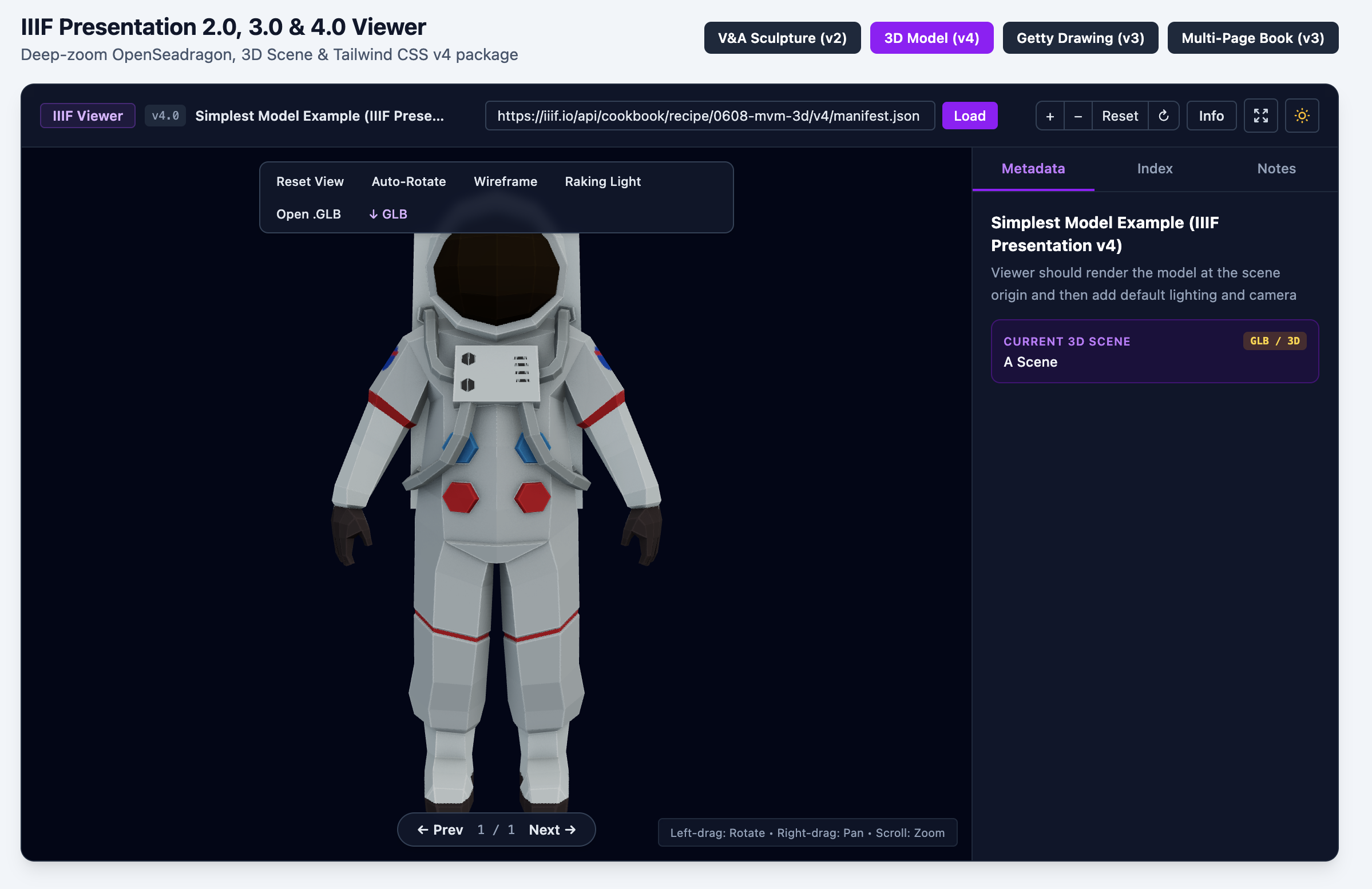
Unified filmstrip for OpenSeadragon 2D images and Three.js WebGL 3D scenes (GLTFLoader + DRACOLoader) with camera presets, wireframe, raking light, local file picker, and IIIF transforms.
Presentation 3 Audio & Video
Compact themed controls, uncropped video with fullscreen support, playback speed, embedded WebVTT captions, and temporal fragment seeking (t=start,end).
Image Inspection & Annotations
Zoom, rotate, flip, and adjust brightness, contrast, grayscale, and inversion. View sanitized HTML metadata, structural ranges, and xywh annotation regions.
Side-by-Side Comparison
Compare 2D, A/V, or 3D resources within or across manifests with synchronized 2D zoom/pan, pane swapping, and pane-aware Info tabs.
Search, Maps & Languages
IIIF Search API support with local metadata/label fallback, MapLibre GL JS navPlace maps, and runtime metadata language switching.
Proxies, Auth & Shadow DOM
Flexible URL rewriting (proxyRoutes), IIIF Auth 1 & 2 sign-in/probe flows, Fullscreen API with iframe fallback, and isolated Shadow DOM styling.
Current Limitations
Review these specification and browser boundaries when integrating the viewer into production portals:
IIIF Authorization & Access Control
- IIIF Auth does not protect 3D models, image-curtain layers, downloads, or thumbnails; these require independently accessible URLs or a suitable proxy.
- The viewer uses the first advertised probe and does not recursively authorize a substitute resource.
- A bare manifest
401/403or CORS failure cannot identify an authorization service. Auth 2 probes require CORS, token services require working cross-site iframe cookies, and sign-in requires popups over HTTPS (localhostis permitted for development). - Native media elements cannot send Auth 1 bearer tokens; A/V authorization depends on browser-supported cookies or a trusted proxy.
Collections, Timelines, Ranges & Annotations
- Collection browsing displays supported members present in the response; it does not follow paged collections, auto-expand references, or guard against cyclic collection links.
- Timelines read
navDatefrom direct collection members or primary-manifest canvases only (not ranges, manifest dates as canvas dates, or secondary comparison panes). - Accepted
navDatestrings include zoned ISO date-times (4–6 year digits, astronomical year numbering where0000= 1 BCE) and explicit BC/BCE/AD/CE year strings as a non-standard convenience. Unzoned, date-only, and ambiguous free-text dates are omitted from timelines. - Overlays support rectangular
xywhregions, not arbitrary annotation selectors. Range navigation resolves direct canvas references only.
3D Models, Audio/Video & Languages
- The local 3D picker works best with self-contained
.glbfiles;.gltffiles with external buffers or textures need those assets reachable. - Draco-compressed models load decoders from Google CDN 1.5.7 by default; set
dracoDecoderPathto self-host decoders. - A/V playback plays the first recognized painting body (including a
Choice); it does not compose multiple timed bodies or enforce fragment end times. Only embedded supplementing WebVTT bodies become caption tracks. - Language maps prefer the selected language, then
none, then the first available entry.
Installation
npm install @micropasts/iiif-viewerAdd a .npmrc file in your project root, then install:
@micropasts:registry=https://npm.pkg.github.comnpm install @micropasts/iiif-viewerCopy dist/iiif-viewer.umd.cjs to your server (includes OpenSeadragon & Three.js):
<div id="viewer"></div>
<script src="/assets/iiif-viewer.umd.cjs"></script>
<script>
  const viewer = new window.IIIFViewer.IIIFViewer('#viewer', {
    manifestUrl: 'https://iiif.io/api/cookbook/recipe/0001-mvm-image/manifest.json',
    height: '680px',
  });
</script>
Quick Start & Embedding Patterns
Instantiate the viewer in a browser with a DOM (3D models and maps also require WebGL). Always call viewer.destroy() when unmounting.
import { IIIFViewer } from '@micropasts/iiif-viewer';

const viewer = new IIIFViewer('#iiif-viewer', {
  manifestUrl: 'https://iiif.vam.ac.uk/collections/O24955/manifest.json',
  theme: 'dark',
  height: '680px',
});
Embedded Mode (Hide URL Bar & Drag-and-Drop)
const viewer = new IIIFViewer('#iiif-viewer', {
  manifestUrl: 'https://iiif.io/api/cookbook/recipe/0009-book-1/manifest.json',
  showUrlInput: false,
  allowManifestDrop: false,
  theme: 'light',
  language: 'en',
  showSidebar: true,
  initialCanvas: 0,
});
Inline Manifest Object & Callbacks
const viewer = new IIIFViewer('#iiif-viewer', {
  manifest: myManifestJsonObject, // takes precedence over manifestUrl
  language: 'en',
  externalViewers: {
    mode: 'append', // 'append' | 'replace', or set externalViewers: false to hide
    viewers: [
      { label: 'My IIIF tool', url: 'https://example.org/viewer?manifest={manifest}' },
    ],
  },
  onManifestLoad(parsed, raw) { console.log('Loaded:', parsed.label); },
  onCanvasChange(canvas, index) { console.log('Canvas:', index, canvas.label); },
  onSelectLocation(feature, { canvasIndex }) { console.log('Location:', feature.properties); },
});
Framework Integration Examples
import { useEffect, useRef } from 'react';
import { IIIFViewer } from '@micropasts/iiif-viewer';

export function MuseumIIIFViewer({ manifestUrl, theme = 'dark', proxyRoutes = null }) {
  const containerRef = useRef(null);
  const instanceRef = useRef(null);

  useEffect(() => {
    if (!containerRef.current) return;
    instanceRef.current = new IIIFViewer(containerRef.current);
    return () => {
      instanceRef.current?.destroy();
      instanceRef.current = null;
    };
  }, []);

  useEffect(() => { instanceRef.current?.setTheme(theme); }, [theme]);
  useEffect(() => { instanceRef.current?.setProxyRoutes(proxyRoutes); }, [proxyRoutes]);
  useEffect(() => {
    if (manifestUrl) instanceRef.current?.loadManifest(manifestUrl);
  }, [manifestUrl]);

  return <div ref={containerRef} />;
}
<script setup>
import { onMounted, onBeforeUnmount, ref, watch } from 'vue';
import { IIIFViewer } from '@micropasts/iiif-viewer';
const props = defineProps({
manifestUrl: { type: String, required: true },
theme: { type: String, default: 'dark' },
proxyRoutes: { type: [Object, Array, Function], default: null },
});
const container = ref(null);
let viewer = null;
onMounted(() => {
viewer = new IIIFViewer(container.value, {
manifestUrl: props.manifestUrl,
theme: props.theme,
proxyRoutes: props.proxyRoutes,
});
});
watch(() => props.manifestUrl, (url) => url && viewer?.loadManifest(url));
watch(() => props.theme, (theme) => viewer?.setTheme(theme));
watch(() => props.proxyRoutes, (routes) => viewer?.setProxyRoutes(routes));
onBeforeUnmount(() => viewer?.destroy());
</script>
<template>
<div ref="container" />
</template>import { IIIFViewer } from '@micropasts/iiif-viewer';
import type { IIIFViewerOptions, NormalizedCanvas } from '@micropasts/iiif-viewer';
const options: IIIFViewerOptions = {
manifestUrl: 'https://example.org/manifest.json',
themeVars: { '--iiif-accent': '#7e22ce' },
onCanvasChange(canvas: NormalizedCanvas, index: number) {
console.log(index, canvas.label);
},
};
const viewer = new IIIFViewer('#viewer', options);Theming & Shadow DOM Isolation
Each viewer mounts inside an open Shadow DOM and injects its own compiled styles, isolating Tailwind preflight from your host application. Importing @micropasts/iiif-viewer/style.css is retained for compatibility but is no longer required.
Customize semantic tokens on the host element or via themeVars / viewer.setThemeVars() (pass null to clear an inline override):
#iiif-viewer {
  --iiif-accent: #b45309;
  --iiif-accent-hover: #92400e;
  --iiif-accent-contrast: #fff;
  --iiif-bg: #f8fafc;
  --iiif-surface: #fff;
  --iiif-surface-muted: #f1f5f9;
  --iiif-text: #1e293b;
  --iiif-text-muted: #475569;
  --iiif-border: #cbd5e1;
  --iiif-radius: 0.75rem;
}Maps (navPlace)
The Map tab loads MapLibre GL JS on demand to render embedded or referenced navPlace GeoJSON features (points, lines, polygons) from the manifest and current canvas.
mapStyle to use another MapLibre style. Because the map worker is bundled inline, restrictive CSP headers may need to permit blob: workers, data: module imports, and requests to your map tile provider.
Physical Ruler, Measurement & Image Curtain
Enable opt-in 2D inspection tools via constructor options or at runtime with viewer.setInspectionTools(...):
- Physical Ruler (
physicalRuler: true): Reads the IIIFphysicalDimensionsextension (mm,cm,in) or lets users enter mm/pixel or draw a manual calibration line across a known distance. - Measurement (
measurement: true): Point-to-point distance, multi-segment polylines, and shoelace polygon area in source pixels or calibrated millimetres/mm². - Image Curtain (
layersCurtain: true): Reveals alternative painting images, IIIFChoicelayers, or matching-dimension canvases from left or top via a draggable divider. - Persistent Orientation (
persistCanvasTransform: true): Preserves 90° rotations and horizontal/vertical flips when moving between canvases in the same manifest.
Side-by-Side Comparison
Set sideBySide: true to enable the Compare toolbar button and enterSideBySide() / exitSideBySide() / toggleSideBySide() methods.
- Compare any combination of 2D, A/V, or 3D canvases within the same manifest or from a secondary manifest URL.
- Sync View locks normalized pan and zoom across two 2D panes; Swap Panes exchanges primary and secondary resources.
- Clicking or focusing a pane updates the Info sidebar to reflect that pane's metadata, annotations, and map features.
Proxy Routing & IIIF Authorization
Rewrite manifest and downstream asset URLs for local development or CORS proxying using proxyRoutes (prefix object, [{ match, replace, types }] array, or (url, resourceType) => string function), proxyUrl, or assetProxyUrl:
const viewer = new IIIFViewer('#iiif-viewer', {
  manifestUrl: 'http://localhost:8000/finds/1704/iiif/manifest',
  proxyRoutes: {
    'http://localhost:8000/images': '/images',
    'http://localhost:8000/finds': '/finds',
  },
});
For access-controlled resources advertising IIIF Auth 1 or Auth 2 services, the viewer handles sign-in popups, hidden-iframe token requests, Auth 2 probes/substitutes, and logout actions while keeping tokens strictly in memory and notifying the host via onAuthChange.
Configuration Options
| Option | Type | Default | Description |
|---|---|---|---|
manifestUrl (or url) | string | '' | URL of a IIIF Presentation manifest or Presentation 2.x/3.0 collection to fetch on mount. |
manifest (or data) | object | string | null | Pre-loaded IIIF manifest or collection JSON object or JSON string. |
proxyRoutes | object | array | function | null | Rewrites URLs of type 'manifest', 'image', 'media', 'model', 'thumbnail', 'annotation', 'search', or 'navplace'. Accepts { prefix: replacement }, [{ match, replace, types }] with string or RegExp matches, or (url, resourceType) => string. Array rule types is optional. |
proxyUrl | string | '' | Prefix URL prepended to encodeURIComponent(url) when fetching manifests and collections. |
assetProxyUrl | string | '' | Prefix URL prepended to encodeURIComponent(url) for downstream resources when no proxyRoutes rule matches. |
dracoDecoderPath | string | Google CDN 1.5.7 | Path/URL to Draco WASM/JS decoders for Draco-compressed .glb models. |
mapStyle | string | object | OpenFreeMap Liberty | MapLibre style URL or style object for the navPlace map. |
theme | 'dark' | 'light' | 'dark' | Initial scoped theme for the viewer container. |
themeVars | object | {} | CSS custom properties (--iiif-*) applied inline to the host. See Customising Colours & Styles. |
logo | { src: string, alt?: string } | null | null | Optional toolbar image before the IIIF Viewer badge. Its aspect ratio is preserved within 120 × 32 CSS pixels. src can be a relative or absolute image URL; alt defaults to an empty string for a decorative logo. |
language | string | 'en' | Preferred language code for manifest labels and metadata. |
summaryCollapseLength | number | 300 | Plain-text summary length above which a Show more control appears; set to 0 or a negative number to disable collapsing. |
physicalRuler | boolean | false | Enable the physical scale and manual calibration controls for 2D images. |
layersCurtain | boolean | false | Enable the image-layer curtain and comparison canvas controls for 2D images. |
sideBySide | boolean | false | Enable the Compare button and programmatic split-pane comparison. |
measurement | boolean | false | Enable point-to-point, polyline and area measurement for 2D images. |
persistCanvasTransform | boolean | false | Keep 2D rotation and horizontal/vertical flips when navigating within a manifest. |
permalink | boolean | object | false | Enable copyable view links and URL restoration; use { prefix: 'name' } to isolate multiple viewers. |
inspector | boolean | false | Enable the IIIF JSON inspector drawer for manifests and the current canvas or scene. |
timeline | boolean | 'scrubber' | false | Enable chronological collection-member navigation and a primary-canvas timeline; true uses a drawer, 'scrubber' a bottom pane. |
imageDownload | boolean | object | false | Enable full-canvas image downloads; optionally configure sizes, limits and full-resolution access. |
height | string | '680px' | CSS height of the viewer container when not in fullscreen; the viewer has a 540px minimum height. |
showUrlInput | boolean | true | Shows or hides the manifest URL input bar in the top toolbar. |
allowManifestDrop | boolean | true | Allows manifest URLs or IIIF links to be dropped onto the viewer for loading. |
showSidebar | boolean | true at widths ≥ 768px; otherwise false | Initial visibility of the Metadata / Index / Notes / Search / Map sidebar. |
resizableSidebar | boolean | false | Enable desktop information-panel resizing; the mobile overlay remains unchanged. |
sidebarTabs | string[] | All five tabs | Select one or more Info tabs using metadata, structures (Index), annotations (Notes), search, and map. Tabs retain their standard order; the first enabled tab is selected initially. |
externalViewers | false | object | Universal Viewer and Tify | Hide, append to, or replace links in the Metadata tab. See Configure external viewer links. |
Instance Methods
| Method | Signature | Description |
|---|---|---|
loadManifest | async loadManifest(url) | Fetches a IIIF manifest or collection from the given URL (applying proxyRoutes / proxyUrl). |
setManifest | async setManifest(jsonOrString) | Parses a manifest or collection JSON object or string directly. |
goToCanvas | async goToCanvas(index) | Navigates to the specified zero-based canvas or 3D scene index. |
setProxyRoutes | setProxyRoutes(routes) | Updates proxyRoutes at runtime and reloads the active canvas/scene. |
setInspectionTools | setInspectionTools({ physicalRuler, layersCurtain, measurement }) | Enables or disables 2D inspection tools at runtime; omitted options retain their current values. Changing the options resets manual calibration, measurements and layer controls. |
enterSideBySide | enterSideBySide() | Opens comparison when enabled and a manifest is loaded; otherwise throws. |
exitSideBySide | exitSideBySide() | Closes comparison and disposes secondary resources. |
toggleSideBySide | toggleSideBySide() | Opens or closes comparison. |
getPermalink | getPermalink() | Returns a shareable URL for the loaded 2D image view when permalink is enabled; throws if the view cannot be shared. |
resolveUrl | resolveUrl(url, resourceType) | Resolves a URL through configured proxyRoutes, assetProxyUrl, or proxyUrl. |
setTheme | setTheme('dark' | 'light') | Switches the viewer theme between dark and light mode. |
setThemeVars | setThemeVars(vars) | Updates --iiif-* host properties; use null to remove an inline value. |
setLanguage | setLanguage(language) | Updates manifest, canvas, and range labels and metadata for the selected language. |
toggleTheme | toggleTheme() | Toggles between dark and light mode. |
toggleSidebar | toggleSidebar() | Shows or hides the sidebar. |
enterFullscreen | async enterFullscreen() | Expands the viewer to fullscreen (with fixed-viewport fallback). |
exitFullscreen | async exitFullscreen() | Exits fullscreen mode. |
toggleFullscreen | toggleFullscreen() | Toggles fullscreen mode. |
destroy | destroy() | Aborts outstanding manifest/search requests and cleans up the map, OpenSeadragon, Three.js resources, event listeners, and DOM nodes. |
Keyboard Shortcuts & Accessibility
- Viewer Container Focused:
←/→change canvas,Itoggles sidebar,Ftoggles fullscreen,+/=and-zoom 2D images,0resets view,Escexits fullscreen fallback or closes overlays. - 2D & 3D Canvas Focused: Arrow keys pan; in 3D,
Shift + Arrowrotates and+/-zoom (non-drag Move view buttons are also provided). - Sidebar & Resizer: Arrow keys,
Home, andEndnavigate tabs and resize the desktop sidebar divider whenresizableSidebar: true. - Accessibility Note: Includes labeled controls, visible focus indicators, and live status announcements; integrators should still test host contrast, alt/summary quality, and assistive technologies (see
ACCESSIBILITY.md).
Local Development, Testing & License
Requires Node.js 22 and npm (project uses Vite 6):
npm install          # Install dependencies
npm run dev          # Local dev server (proxies /images and /finds to localhost:8000)
npm run build        # Build npm library bundle into dist/
npm run build:docs   # Build static demo site into docs/ for GitHub Pages
npm test             # Run Vitest unit & component tests
npm run test:e2e     # Run Playwright browser tests
Licensed under Mozilla Public License 2.0 (MPL-2.0). See CONTRIBUTING.md, CITATION.cff, and SECURITY.md in the repository.